SpringBoot3+Vue3 前后端分离项目基于Jwt的校验方案
视频地址
配置SpringSecurity基本内容
SecurityConfiguration
1
2
3
4
5
6
7
8
9
10
11
12
13
14
15
16
17
18
19
20
21
22
23
24
25
26
27
28
29
30
31
32
33
34
35
36
37
38
39
40
41
42
43
44
45
46
| @Configuration
public class SecurityConfiguration {
@Bean
public SecurityFilterChain filterChain(HttpSecurity http) throws Exception {
return http
.authorizeHttpRequests(conf -> conf
.requestMatchers("/api/auth/**").permitAll()
.anyRequest().authenticated()
)
.formLogin(conf -> conf
.loginProcessingUrl("/api/auth/login")
.successHandler(this::onAuthenticationSuccess)
.failureHandler(this::onAuthenticationFailure)
)
.logout(conf -> conf
.logoutUrl("/api/auth/logout")
.logoutSuccessHandler(this::onLogoutSuccess)
)
.csrf(AbstractHttpConfigurer::disable)
.sessionManagement(conf -> conf
.sessionCreationPolicy(SessionCreationPolicy.STATELESS)
)
.build();
}
public void onAuthenticationSuccess(HttpServletRequest request,
HttpServletResponse response,
Authentication authentication) throws IOException, ServletException {
response.setContentType("application/json;charset=UTF-8");
response.getWriter().write(RestBean.success().asJSONString());
}
public void onAuthenticationFailure(HttpServletRequest request,
HttpServletResponse response,
AuthenticationException exception) throws IOException, ServletException {
response.setContentType("application/json;charset=UTF-8");
response.getWriter().write(RestBean.failure(401,exception.getMessage()).asJSONString());
}
public void onLogoutSuccess(HttpServletRequest request,
HttpServletResponse response,
Authentication authentication) throws IOException, ServletException {
}
}
|
RestBean
1
2
3
4
5
6
7
8
9
10
11
12
13
14
15
16
17
18
| public record RestBean<T>(int code, T data, String message) {
public static <T> RestBean<T> success(T data) {
return new RestBean<>(200, data, "请求成功");
}
public static <T> RestBean<T> success() {
return success(null);
}
public static <T> RestBean<T> failure(int code, String message) {
return new RestBean<>(code, null, message);
}
public String asJSONString() {
return JSONObject.toJSONString(this, JSONWriter.Feature.WriteNulls);
}
}
|
Jwt令牌颁发
JwtUtils
1
2
3
4
5
6
7
8
9
10
11
12
13
14
15
16
17
18
19
20
21
22
23
24
25
26
27
28
29
30
31
32
33
34
35
| @Component
public class JwtUtils {
@Value("${spring.security.jwt.key}")
String key;
@Value("${spring.security.jwt.expire}")
int expire;
public String createJwt(UserDetails details, int id, String username) {
Algorithm algorithm = Algorithm.HMAC256(key);
Date expireTime = this.expireTime();
return JWT.create()
.withClaim("id", id)
.withClaim("username", username)
.withClaim("authorities", details.getAuthorities().stream().map(GrantedAuthority::getAuthority).toList())
.withExpiresAt(expireTime)
.withIssuedAt(new Date())
.sign(algorithm);
}
public Date expireTime() {
Calendar calendar = Calendar.getInstance();
calendar.add(Calendar.HOUR, expire * 24);
return calendar.getTime();
}
}
|
entity
dto
数据库层面用dto
vo
跟前端交互用vo
提交给前端
1
2
3
4
5
6
7
| @Data
public class AuthorizeVO {
String username;
String role;
String token;
Date expireTime;
}
|
SecurityConfiguration
1
2
3
4
5
6
7
8
9
10
11
12
13
14
15
| public void onAuthenticationSuccess(HttpServletRequest request,
HttpServletResponse response,
Authentication authentication) throws IOException, ServletException {
response.setContentType("application/json;charset=UTF-8");
User principal = (User) authentication.getPrincipal();
String token = jwtUtils.createJwt(principal, 1, "小明");
AuthorizeVO authorizeVO = new AuthorizeVO();
authorizeVO.setToken(token);
authorizeVO.setRole("");
authorizeVO.setExpireTime(jwtUtils.expireTime());
authorizeVO.setUsername("小明");
response.getWriter().write(RestBean.success(authorizeVO).asJSONString());
}
|
Jwt请求头校验
用户每次向后端请求数据,会携带token,在SpringSecurity过滤链中进行校验
SecurityConfiguration
1
2
3
4
5
6
7
8
9
10
11
12
13
14
15
16
17
18
19
20
21
22
23
24
25
26
27
28
29
30
31
32
33
34
35
36
37
38
39
40
41
42
43
44
45
46
47
48
49
50
51
52
53
54
55
56
57
58
59
60
61
62
63
64
65
66
67
68
69
70
71
72
73
74
75
76
77
78
79
80
81
82
| @Configuration
public class SecurityConfiguration {
@Resource
JwtUtils jwtUtils;
@Resource
JwtAuthorizeFilter jwtAuthorizeFilter;
@Bean
public SecurityFilterChain filterChain(HttpSecurity http) throws Exception {
return http
.authorizeHttpRequests(conf -> conf
.requestMatchers("/api/auth/**").permitAll()
.anyRequest().authenticated()
)
.formLogin(conf -> conf
.loginProcessingUrl("/api/auth/login")
.successHandler(this::onAuthenticationSuccess)
.failureHandler(this::onAuthenticationFailure)
)
.logout(conf -> conf
.logoutUrl("/api/auth/logout")
.logoutSuccessHandler(this::onLogoutSuccess)
)
.exceptionHandling(conf -> conf
.authenticationEntryPoint(this::commence)
.accessDeniedHandler(this::handle)
)
.csrf(AbstractHttpConfigurer::disable)
.sessionManagement(conf -> conf
.sessionCreationPolicy(SessionCreationPolicy.STATELESS)
)
.addFilterBefore(jwtAuthorizeFilter, UsernamePasswordAuthenticationFilter.class)
.build();
}
public void onAuthenticationSuccess(HttpServletRequest request,
                                    HttpServletResponse response,
                                    Authentication authentication) throws IOException, ServletException {
    response.setContentType("application/json;charset=UTF-8");
    User principal = (User) authentication.getPrincipal();
    String token = jwtUtils.createJwt(principal, 1, "小明");

    AuthorizeVO authorizeVO = new AuthorizeVO();
    authorizeVO.setToken(token);
    authorizeVO.setRole("");
    authorizeVO.setExpireTime(jwtUtils.expireTime());
    authorizeVO.setUsername("小明");

    response.getWriter().write(RestBean.success(authorizeVO).asJSONString());
}
public void onLogoutSuccess(HttpServletRequest request,
HttpServletResponse response,
Authentication authentication) throws IOException, ServletException {
}
public void onAuthenticationFailure(HttpServletRequest request,
HttpServletResponse response,
AuthenticationException exception) throws IOException, ServletException {
response.setContentType("application/json;charset=UTF-8");
response.getWriter().write(RestBean.unauthorized(exception.getMessage()).asJSONString());
}
public void handle(HttpServletRequest request,
HttpServletResponse response,
AccessDeniedException accessDeniedException) throws IOException, ServletException {
response.setContentType("application/json;charset=UTF-8");
response.getWriter().write(RestBean.forbidden(accessDeniedException.getMessage()).asJSONString());
}
public void commence(HttpServletRequest request,
HttpServletResponse response,
AuthenticationException authException) throws IOException, ServletException {
response.setContentType("application/json;charset=UTF-8");
response.getWriter().write(RestBean.unauthorized(authException.getMessage()).asJSONString());
}
}
|
添加过滤addFilterBefore
1
| addFilterBefore(jwtAuthorizeFilter, UsernamePasswordAuthenticationFilter.class)
|
JwtAuthorizeFilter
验证jwt
1
2
3
4
5
6
7
8
9
10
11
12
13
14
15
16
17
18
19
20
21
22
| @Component
public class JwtAuthorizeFilter extends OncePerRequestFilter {
@Resource
JwtUtils jwtUtils;
@Override
protected void doFilterInternal(HttpServletRequest request,
HttpServletResponse response,
FilterChain filterChain) throws ServletException, IOException {
String authorization = request.getHeader("Authorization");
DecodedJWT jwt = jwtUtils.resolveJwt(authorization);
if (jwt != null) {
UserDetails user = jwtUtils.toUser(jwt);
UsernamePasswordAuthenticationToken authentication = new UsernamePasswordAuthenticationToken(user, null, user.getAuthorities());
authentication.setDetails(new WebAuthenticationDetailsSource().buildDetails(request));
SecurityContextHolder.getContext().setAuthentication(authentication);
request.setAttribute("id", jwtUtils.toId(jwt));
}
filterChain.doFilter(request, response);
}
}
|
Jwt退出登录
redis基本部署
使用redis实现黑名单功能,用户在退出登录时会将token的uuid存放在redis数据库上,用户在每次请求数据时,后端会校验token是否合法,然后校验是否在黑名单中,如果这两项其中有一个不符合要求则拒绝请求
1
2
3
4
5
6
7
8
9
10
11
12
13
14
15
16
17
18
19
20
21
22
23
24
25
26
27
28
29
30
31
32
33
34
35
36
37
38
39
40
41
42
43
44
45
46
47
48
49
50
51
52
53
54
55
56
57
58
59
60
61
62
63
| @Resource
StringRedisTemplate template;
public boolean invalidToken(String headerToken) {
String token = this.convertToken(headerToken);
if (token == null) {
return false;
}
Algorithm algorithm = Algorithm.HMAC256(key);
JWTVerifier jwtVerifier = JWT.require(algorithm).build();
try{
DecodedJWT verify = jwtVerifier.verify(token);
String id = verify.getId();
return deleteToken(id, verify.getExpiresAt());
} catch (JWTVerificationException e) {
return false;
}
}
private boolean deleteToken(String uuid, Date time) {
if (this.isInvalidToken(uuid)) {
return false;
}
Date now = new Date();
long expire = Math.max(time.getTime() - now.getTime(), 0);
template.opsForValue().set(Const.JWT_BLACK_LIST + uuid, "", expire, TimeUnit.MICROSECONDS);
return true;
}
private boolean isInvalidToken(String uuid) {
return Boolean.TRUE.equals(template.hasKey(Const.JWT_BLACK_LIST + uuid));
}
public DecodedJWT resolveJwt(String headerToken) {
String token = this.convertToken(headerToken);
if (token == null) {
return null;
}
Algorithm algorithm = Algorithm.HMAC256(key);
JWTVerifier jwtVerifier = JWT.require(algorithm).build();
try {
DecodedJWT verify = jwtVerifier.verify(token);
if (this.isInvalidToken(verify.getId())) {
return null;
}
Date expiresAt = verify.getExpiresAt();
return new Date().after(expiresAt) ? null : verify;
} catch (JWTVerificationException e) {
return null;
}
}
|
实现数据库的用户校验
需要从数据库或其他源加载用户信息时,实现 UserDetailsService 并配置到 Spring Security 上下文中
实现mapper,service
AccountServiceImpl
1
2
3
4
5
6
7
8
9
10
11
12
13
14
15
16
17
18
19
20
21
22
23
24
25
26
| @Service
public class AccountServiceImpl extends ServiceImpl<AccountMapper, Account> implements AccountService {
@Override
public UserDetails loadUserByUsername(String username) throws UsernameNotFoundException {
Account account = this.findAccountByNameOrEmail(username);
if (account == null) {
throw new UsernameNotFoundException("用户名或密码错误");
}
return User
.withUsername(username)
.password(account.getPassword())
.roles(account.getRole())
.build();
}
@Override
public Account findAccountByNameOrEmail(String text) {
return this.query()
.eq("username", text)
.or()
.eq("email", text)
.one();
}
}
|
基本页面配置
登录界面编写
Axios请求封装
跨域手动配置
1
2
3
4
5
6
7
8
9
10
11
12
13
14
15
16
17
18
19
20
|
@Component
@Order(Const.ORDER_CORS)
public class CorsFilter extends HttpFilter {
@Override
protected void doFilter(HttpServletRequest request,
HttpServletResponse response,
FilterChain chain) throws IOException, ServletException {
this.addCorsHeader(request, response);
chain.doFilter(request, response);
}
private void addCorsHeader(HttpServletRequest request, HttpServletResponse response) {
response.setHeader("Access-Control-Allow-Origin", request.getHeader("Origin"));
response.setHeader("Access-Control-Allow-Methods", "POST, GET, OPTIONS, DELETE, PUT");
response.setHeader("Access-Control-Allow-Headers", "Content-Type, Authorization");
}
}
|
退出登录以及路由守卫实现
验证码发送
registerEmailVerifyCode
用户在请求验证码时,后端会将用户的验证码类型、邮箱、验证码和ip包装成一个map,并转存到消息队列中,还有将验证码存入到redis中,供后续验证
1
2
3
4
5
6
7
8
9
10
11
12
13
14
15
16
17
18
19
20
| @Override
public String registerEmailVerifyCode(String type, String email, String ip) {
synchronized (ip.intern()) {
if (!this.verifyLimit(ip)) {
return "请求过于频繁";
}
Random random = new Random();
int code = random.nextInt(899999) + 100000;
Map<String, Object> data = Map.of("type", type, "email", email, "code", code);
amqpTemplate.convertAndSend("mail", data);
stringRedisTemplate.opsForValue()
.set(Const.VERIFY_EMAIL_DATA + email, String.valueOf(code), 3, TimeUnit.MINUTES);
return null;
}
}
private boolean verifyLimit(String ip) {
String key = Const.VERIFY_EMAIL_LIMIT + ip;
return flowUtils.limitOnceCheck(key,60);
}
|
sendMailMessage
在队列的监听器中,监听器根据队列里的内容发送对应邮件
1
2
3
4
5
6
7
8
9
10
11
12
13
14
15
16
17
18
19
20
21
22
| @RabbitHandler
public void sendMailMessage(Map<String, Object> data) {
String email = (String) data.get("email");
Integer code = (Integer) data.get("code");
String type = (String) data.get("type");
SimpleMailMessage message = switch (type) {
case "register" -> createMessage("注册验证码", "您的验证码是" + code, email);
case "forget" -> createMessage("忘记密码验证码", "您的验证码是" + code, email);
default -> null;
};
if (message == null) return;
sender.send(message);
}
private SimpleMailMessage createMessage(String title, String content, String email) {
SimpleMailMessage message = new SimpleMailMessage();
message.setSubject(title);
message.setText(content);
message.setTo(email);
message.setFrom(username);
return message;
}
|
创建队列
1
2
3
4
5
6
7
8
9
10
11
12
13
14
15
16
| @Configuration
public class RabbitConfiguration {
@Bean("emailQueue")
public Queue emailQueue() {
return QueueBuilder
.durable("mail")
.build();
}
@Bean
public Jackson2JsonMessageConverter jsonMessageConverter(ObjectMapper objectMapper) {
return new Jackson2JsonMessageConverter(objectMapper);
}
}
|
注册接口实现
register
1
2
3
4
| @PostMapping("/register")
public RestBean<Void> register(@RequestBody @Validated EmailRegisterVO emailRegisterVO) {
return this.messageHandle(() -> accountService.registerEmailAccount(emailRegisterVO));
}
|
registerEmailAccount
1
2
3
4
5
6
7
8
9
10
11
12
13
14
15
16
17
18
19
20
| public String registerEmailAccount(EmailRegisterVO emailRegisterVO) {
String email = emailRegisterVO.getEmail();
String code = stringRedisTemplate.opsForValue().get(Const.VERIFY_EMAIL_DATA + email);
if (code == null || !code.equals(emailRegisterVO.getCode())) {
return "验证码错误";
}
if (this.existsAccountByEmail(email)) {
return "邮箱已被注册";
}
if (this.existsAccountByUsername(emailRegisterVO.getUsername())) {
return "用户名已被注册";
}
Account account = new Account(null, emailRegisterVO.getUsername(), passwordEncoder.encode(emailRegisterVO.getPassword()), email, "user", new Date());
if (this.save(account)) {
stringRedisTemplate.delete(Const.VERIFY_EMAIL_DATA + email);
return null;
} else {
return "内部错误,请稍后再试";
}
}
|
注册界面编写
完善注册操作
密码重置页面
密码重置接口设计
首先用户向后端请求验证码,来验证邮箱是否正确,以此来判断用户是否可以重置密码
接口restConfirm
1
2
3
4
| @PostMapping("/reset-confirm")
public RestBean<Void> restConfirm(@RequestBody @Valid ConfirmResetVO vo) {
return this.messageHandle(() -> accountService.restConfirm(vo));
}
|
1
2
3
4
5
6
7
8
9
10
11
12
13
| @Override
public String restConfirm(ConfirmResetVO vo) {
String email = vo.getEmail();
String code = stringRedisTemplate.opsForValue().get(Const.VERIFY_EMAIL_DATA + email);
if (code == null) {
return "请先获取验证码";
}
if (!code.equals(vo.getCode())) {
return "验证码错误";
}
return null;
}
|
然后进行重置密码,此操作也需要判断验证码是否正确
接口
1
2
3
4
| @PostMapping("/reset-password")
public RestBean<Void> restConfirm(@RequestBody @Valid EmailRestVO vo) {
return this.messageHandle(() -> accountService.restEmailAccountPassword(vo));
}
|
1
2
3
4
5
6
7
8
9
10
11
12
13
14
| @Override
public String restEmailAccountPassword(EmailRestVO vo) {
String email = vo.getEmail();
String verify = this.restConfirm(new ConfirmResetVO(email, vo.getCode()));
if (verify != null) {
return verify;
}
String password = passwordEncoder.encode(vo.getPassword());
boolean update = this.update().eq("email", email).set("password", password).update();
if(update){
stringRedisTemplate.delete(Const.VERIFY_EMAIL_DATA + email);
}
return null;
}
|
实现限流操作
1
2
3
4
5
6
7
8
9
10
11
12
13
14
15
16
17
18
19
20
21
22
23
24
25
26
27
28
29
30
31
32
33
34
35
36
37
38
39
40
41
42
43
44
45
46
47
| @Component
@Order(Const.ORDER_LIMIT)
public class FlowLimitFilter extends HttpFilter {
@Resource
StringRedisTemplate template;
@Override
protected void doFilter(HttpServletRequest request, HttpServletResponse response, FilterChain chain) throws IOException, ServletException {
String address = request.getRemoteAddr();
if (this.tryCount(address)) {
chain.doFilter(request, response);
} else {
this.writeBlockMessage(response);
}
}
private void writeBlockMessage(HttpServletResponse response) throws IOException {
response.setStatus(HttpServletResponse.SC_FORBIDDEN);
response.setContentType("application/json;charset=UTF-8");
response.getWriter().write(RestBean.forbidden("操作频繁,请稍后重试").asJSONString());
}
private boolean tryCount(String ip) {
synchronized (ip.intern()) {
if(Boolean.TRUE.equals(template.hasKey(Const.FLOW_LIMIT_BLOCK + ip))) {
return false;
}
return this.limitPeriodCheck(ip);
}
}
private boolean limitPeriodCheck(String ip) {
if (Boolean.TRUE.equals(template.hasKey(Const.FLOW_LIMIT_COUNTER + ip))) {
Long increment = Optional.ofNullable(template.opsForValue().increment(Const.FLOW_LIMIT_COUNTER + ip)).orElse(0L);
if (increment > 0) {
template.opsForValue().set(Const.FLOW_LIMIT_BLOCK + ip, "", 30, TimeUnit.SECONDS);
}
} else {
template.opsForValue().set(Const.FLOW_LIMIT_COUNTER + ip, "1", 3, TimeUnit.SECONDS);
}
return true;
}
}
|
适配深色模式
补充1:JWT
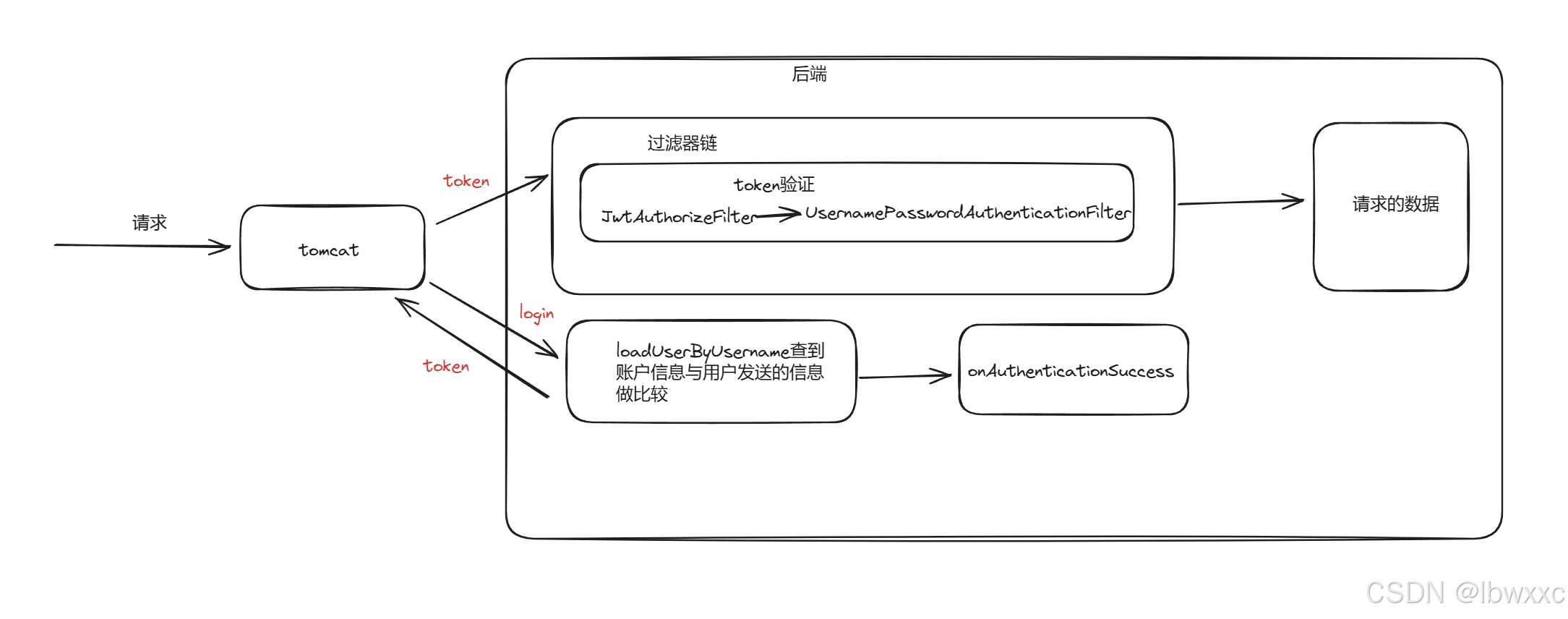
- 用户在登录时UserDetailsService类中的loadUserByUsername方法会根据用户发来的信息(例如账户名)来查询账户信息,与用户发来的账户信息比较,若验证通过,则会调用onAuthenticationSuccess方法生成token并返回前端
- 用户在登录成功,在发起其他请求时会携带该token,先通过JwtAuthorizeFilter过滤器根据token生成user,并设置到上下文,供后续过滤器验证